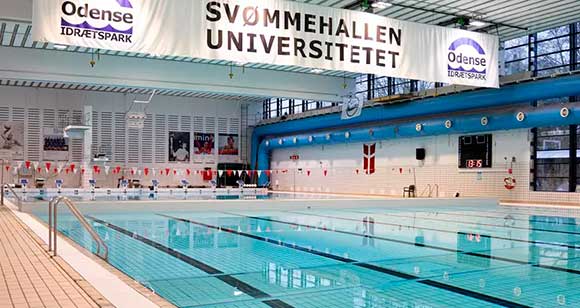
Check when you can swim
Check the Department of Sports Science and Clinical Biomechanics' overview schedule to see when the swimming pool is available to SDU employees and students.
Overview schedule for the swimming pool (PDF) – updated 13.10.2026
The schedule shows when the swimming pool is available to employees and students at SDU. Closed times are marked in yellow in the PDF schedule.
Access is not available every week, so remember to check the schedule before going to the swimming pool. SDU regularly updates the schedule with access times.
If the schedule shows that the swimming pool is closed on a particular day, this also applies to the morning swimming hours from 06:00 to 08:00. For larger swimming events, the swimming pool may also be closed to employees.
Questions about the schedule should be directed to the Department of Sports Science and Clinical Biomechanics.
Access to the swimming pool between 08:00 and 14:00
If you want to swim between 08:00 and 14:00, first check the overview schedule to see whether the swimming pool is available. If access is available, you can go to the changing room.
You do not need a wristband during this period. You only need to show your employee card. If you do not have an employee card, you must bring your employment contract or other documentation showing your connection to SDU. The documentation can be shown on your mobile phone.
You must leave the changing room no later than 14:15.
Morning swimming between 06:00 and 08:00
As an SDU employee, you can swim on weekdays between 06:00 and 08:00.
The swimming pool is also open to the public during this period, so you must wear a wristband while swimming. You collect the wristband from the ticket machine when entering the swimming pool.
Before you can collect a wristband, you must have an access card for the swimming pool. The access card is only valid for the University Swimming Pool.
How to get an access card for morning swimming
1. Create a profile in Nem Billet
First, create a profile in the swimming pool's ticket system, Nem Billet:
Create a profile in Nem Billet
If you already have a profile, you do not need to create a new one. The access card will be added to your existing profile together with your other tickets. You can read more about Nem Billet on Odense Idrætspark's website.
2. Contact Odense Idrætspark
Once you have created your profile, send an email from your SDU email address to idraetsparken@odense.dk.
Your email must state that you want access to the swimming pool in the morning as an SDU employee. You must also provide the information your profile was created with, such as your name, address, telephone number and email address.
If you do not have an SDU email address, attach a picture of your staff card.
Odense Idrætspark will add an access card to your profile and notify you when it has been created.
Admission requirements and rules
Keep up to date with admission requirements, rules and practical information on Odense Idrætspark's website.
Always follow the instructions given by the staff at the swimming pool.
Remember your own padlock
You must bring your own padlock for the lockers in the swimming pool's changing rooms. We recommend a combination lock.
Only in Odense
Due to current rules regarding employee benefits, it is only possible to offer swimming to employees on campus Odense.