Plagiarism check
Strike Plagiarism checks against 3 sources: the internet, material from publishing companies, and other institutions licensed to the system, including most Danish universities.
Previous assignments submitted at SDU are also uploaded to Strike Plagiarism.
3 things to know about plagiarism check of assignments in Strike Plagiarism
All assignments submitted in the Digital Exam system are automatically checked for plagiarism in Strike Plagiarism. But you as a teacher are responsible for reviewing the plagiarism report.
You should always review the report if the plagiarism check shows a high overlap score or if you you suspect plagiarism when reviewing an assignment.
A high overlap may also be caused by the student having many quotes in the assignment or by several students having the same references in their literature lists. There can also be large differences from degree programme to degree programme – and from course to course – as to when the score is considered high.
Therefore, you have to get an overview of what the average is for each exam, and then examine the assignments that stand out.
If Strike Plagiarism has already found the problematic sections, you need not indicate sources of the overlap in the assignment, as the Strike Plagiarism report all by itself constitutes the necessary documentation for a plagiarism case, cf. point 2 below.
However, in case of plagiarism from physical sources, you will have to use the old standard method.
How to access the plagiarism reports
- When you are logged in to the Digital Exam system, you can see text similarity (in percentage) next to each exam participant:
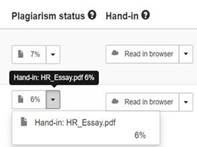
- If you click the arrow next to the score, you can access a list of the submitted documents (the assignment itself and any attachments).
- Click on a document name, and the Strike Plagiarism report for that document will open.
If you suspect plagiarism
If you suspect plagiarism, whether you are a teacher, external examiner or internal examiner, you should contact the Head of Studies for a professional assessment.
The Strike Plagiarism analysis cannot stand alone.
Plagiarism check of assignments submitted in other systems
If you want a plagiarism check of assignments submitted in other systems with no automatic plagiarism check, please send an email with the assignment in PDF format to nat-eksamen@sdu.dk.