M365
Get to know Copilot
Have you recently acquired a license for Microsoft Copilot Premium and want to familiarize yourself with the tool? Then you’ve come to the right place.
Here, you’ll find an introduction to Copilot’s key features and practical advice on how to effectively integrate them into your daily work.
Copilot Chat Basic vs. Microsoft Copilot Premium: What is the difference?
Copilot Chat Basic is a classic chatbot that can help you search for information online, generate ideas, summarize, draft texts – and everything else typically associated with such chatbots. This version of Copilot is available to everyone.
Microsoft Copilot Premium requires an additional license. In return, it is directly integrated into other Microsoft programs such as Teams, Word, Excel, PowerPoint, and Outlook. It can also access organizational data and can therefore search everything from your calendar to the files you have access to.
One could say that with Microsoft Copilot Premium, you get your very own AI assistant that has access to the same things as you do, and can therefore assist you even better in your daily work.
How to Access Microsoft Copilot Premium
You can find the web version of Microsoft Copilot Premium at this address: https://copilot.sdu.dk.
Ensure that you are logged in with your SDU account. If you see a green shield in the top-right corner of the screen, it means you are logged in – and that corporate data protection is enabled. You can read more about Copilot and data protection here.
You can download the desktop or mobile app directly from the web version.
In the top-left corner near your name, you will find the menu with three dots. Open the menu to download apps for computer and mobile.
You will also find the settings here.
Note: If you download the mobile app from your phone, make sure to select the one named “M365 Copilot”.
Get started in a flash
Here are three things you can do right away to get to know Microsoft Copilot Premium's features:
- Ask what meetings you have scheduled for the upcoming week and how to best prepare for them.
- Ask Copilot to summarize a recent email thread and highlight the key points.
- Ask Copilot to translate a PowerPoint presentation from Danish to English.
Overview of features in M365 Copilot
-
Chat
-
Dictation
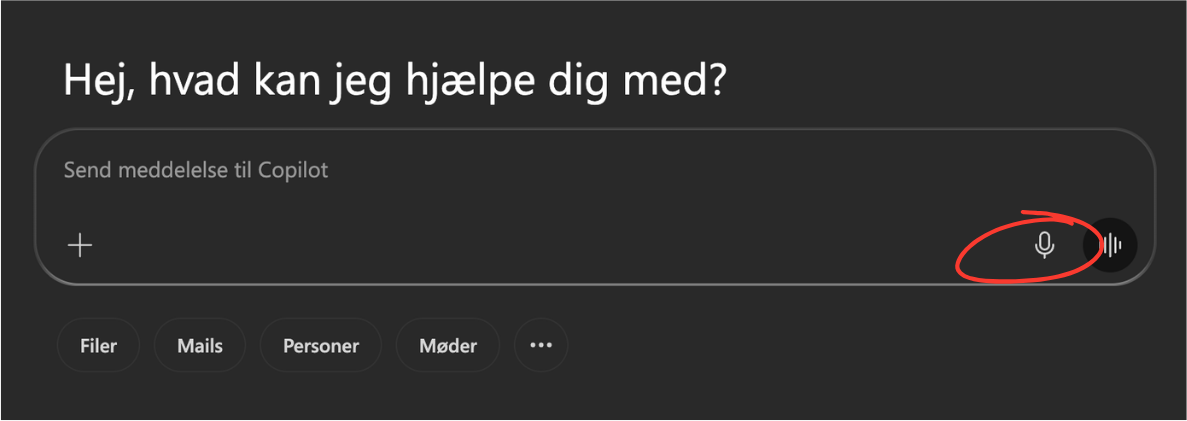
With the dictation feature, you can dictate instead of typing. Copilot translates your speech into text as you speak. Dictation is useful if you need to clear your mind, as it allows you to talk your way to a rough draft, which you can then refine further with Copilot. However, there’s no need for the conversation to end here! If you wish, you can continue the dialogue as a voice chat.
Try it yourself: Click on the dictation icon(a microphone), and speak a prompt that you otherwise intended to write.
-
Voice Chat
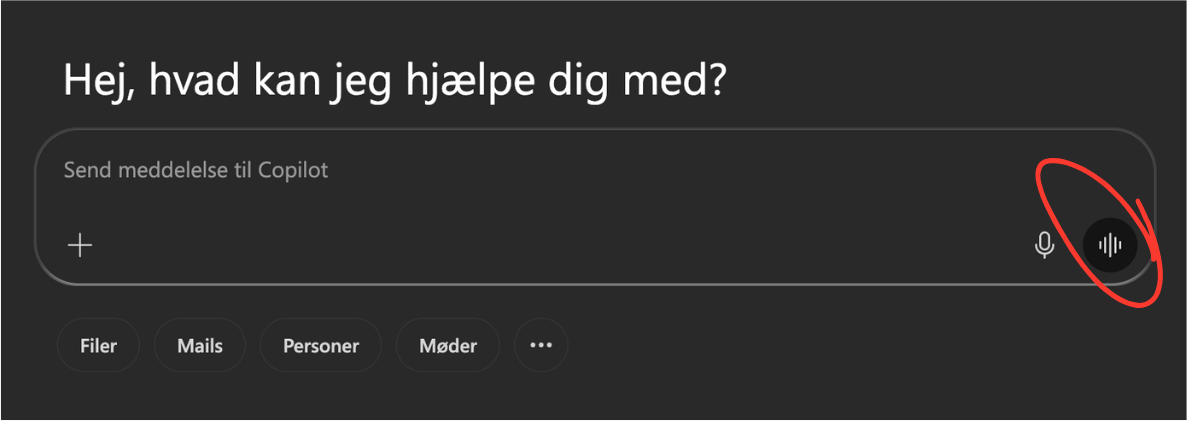
The voice chat takes the dictation function in M365 Copilot a step further. With this feature, you can talk to Copilot in real-time. You can use the feature for everything you would otherwise use Copilot's chat function for, but the special aspect here is that it happens through a fluid conversation. For example, it is smart if you need to think out loud, want feedback on an idea, or need to practice an important presentation.
The only downside is that a lively session of voice chat can disturb your colleagues if you share an office with someone.
Try it yourself: Click on the voice chat icon (which resembles sound waves), and tell Copilot about a task you want feedback on.
-
Create Media
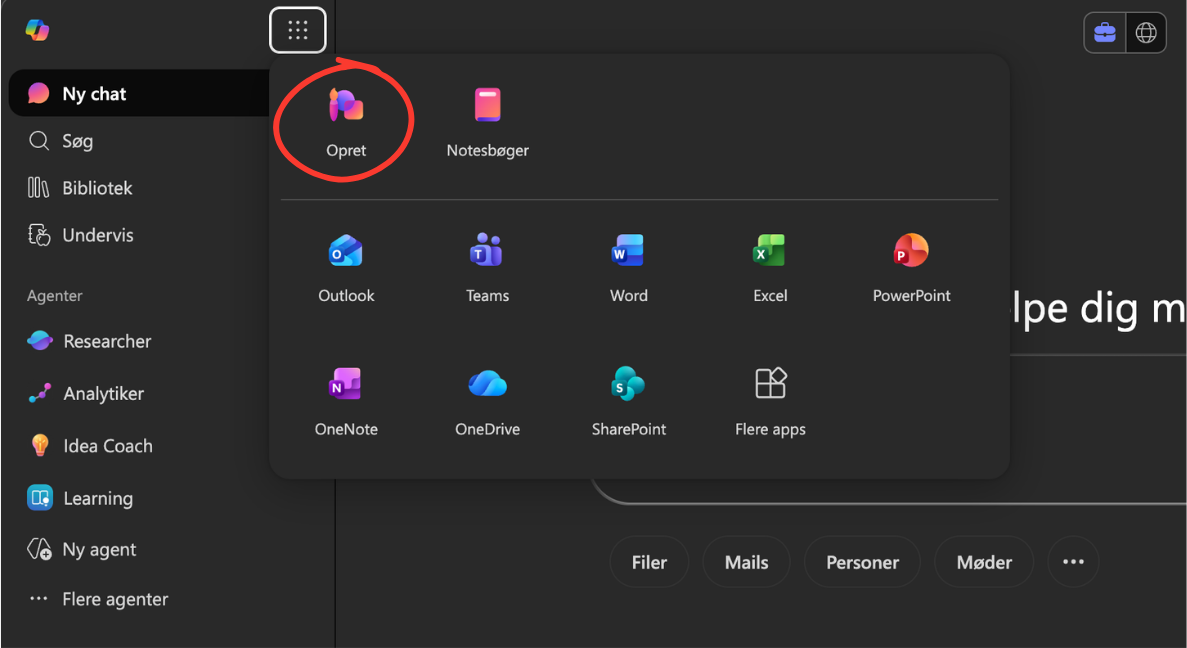
This feature is simply called "Create" in M365 Copilot. And what can you create, you ask? Well, quite a bit actually: images, videos, infographics, report templates, posters, and presentations. And more.
The feature can be useful if you find yourself in a pinch and need an image for a presentation or similar. However, note that SDU Communication has specific guidelines on how you should use AI-generated material in your communication.
Try it yourself: Click "Create" and ask Copilot to create an infographic based on this guide.
-
Agents
The word "agent" might make it sound as if Copilot can handle all your work tasks on its own. That is not how it works.
An agent in M365 Copilot is a customized chatbot that responds based on specific instructions, sources, or workflows.
Agents are particularly useful if you perform the same task multiple times or often need answers within a specific topic. You can both create your own agents and use the predefined agents that already exist in M365 Copilot. You can find them under "All agents."
When you create an agent, you can provide it with instructions and choose which sources it should use. These could, for example, be files or links. You can also share the agent with others who are licensed for M365 Copilot.
An agent can therefore help you perform tasks more consistently and efficiently in your daily work.
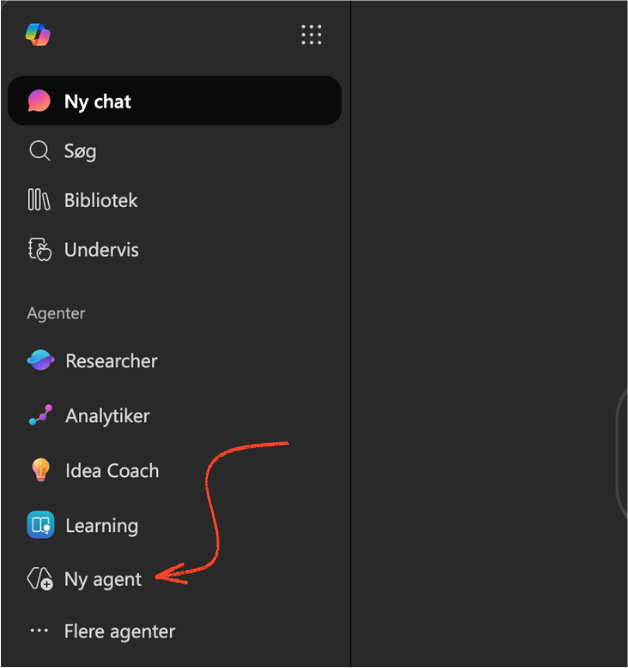
Try it yourself: Create your own agent (click "New agent" under the Agents menu in Copilot) based on a collection of materials you frequently search for information in.
-
Notebooks
With notebooks in M365 Copilot, you can gather a wealth of material in one place and work on it with focus. You can think of the notebook as a kind of project folder where all your chats and files related to the project are stored in the same location. Similar to agents, notebooks help tailor the context from which Copilot provides responses.
You can also invite others to your notebooks so you can collaborate on the same project.
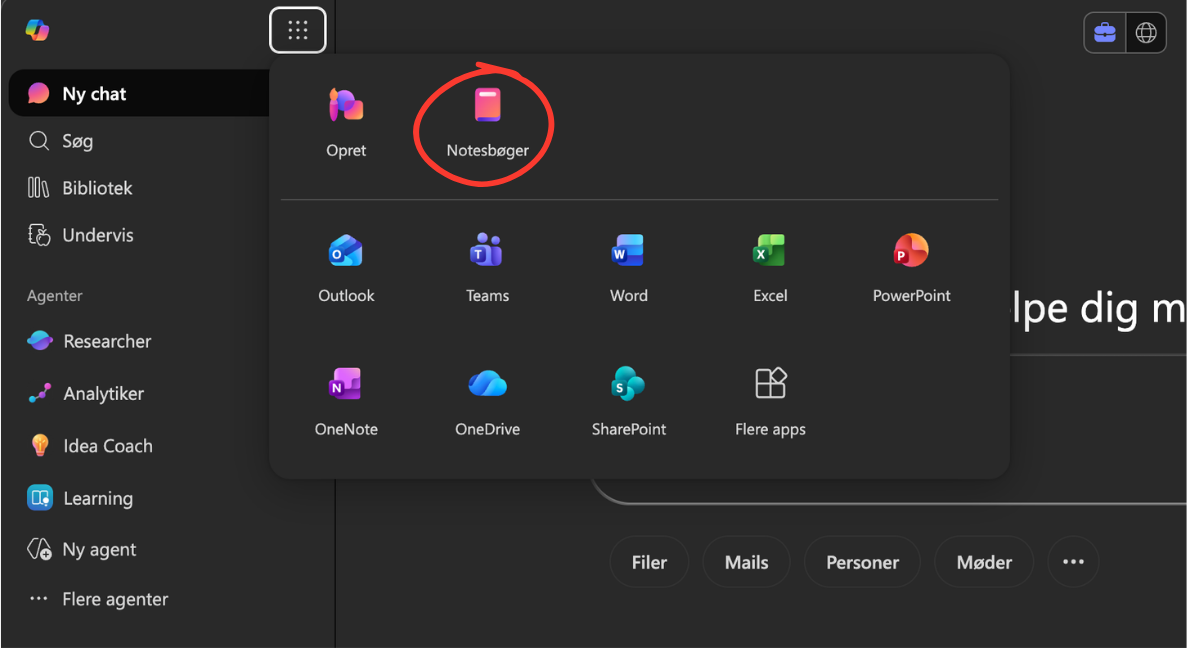
Additionally, notebooks include a bonus feature that allows you to create podcast-like audio files from the material you have stored. There are bound to be situations where this feature proves to be practical.Try it yourself: Create a notebook for a project you are working on (click the icon with 9 dots at the top of Copilot's menu to select Notebooks) – and have Copilot create an audio overview of the material.
-
Integrations
One of the biggest advantages of M365 Copilot is that it is integrated into the Microsoft programs you already use. This means that Copilot can assist you while you work in, for example, Outlook, Word, or Excel. To summon your personal AI assistant in these programs, simply click on the Copilot icon. Note: When you work with Copilot in other programs, the chat is saved in M365 Copilot.
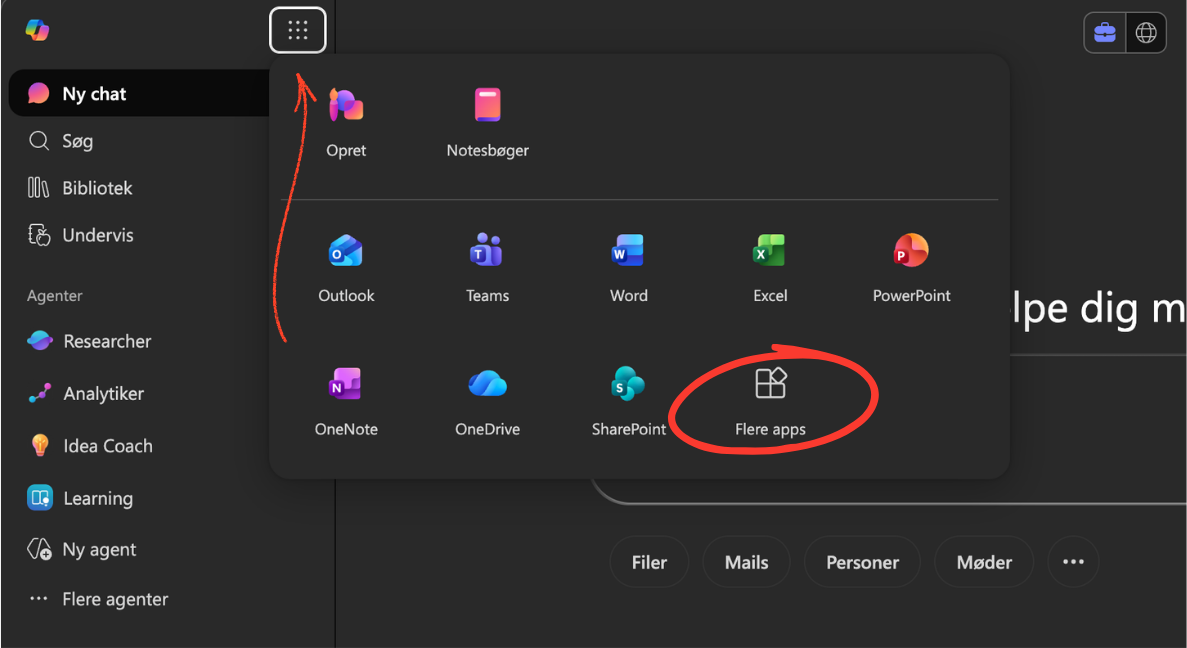
The integration between M365 Copilot and the other Microsoft programs works both ways: You can also work from Copilot into the programs if you prefer. Simply click on “More apps” to select the Microsoft programs you wish to have available within Copilot itself.
Try it yourself: Transcribe an online meeting in Teams, which you then ask Copilot to turn into a summary in Word, which you then turn into a presentation in PowerPoint, which you then present at a meeting in Teams, which you then…
-
Saved Memories
This is a well-hidden feature in M365 Copilot, but it is worth knowing. Your Copilot is personal, and it continuously updates its knowledge about you based on your correspondence. Unless you disable it, it also has access to your work profile. Both aspects provide Copilot with a better foundation to assist you.
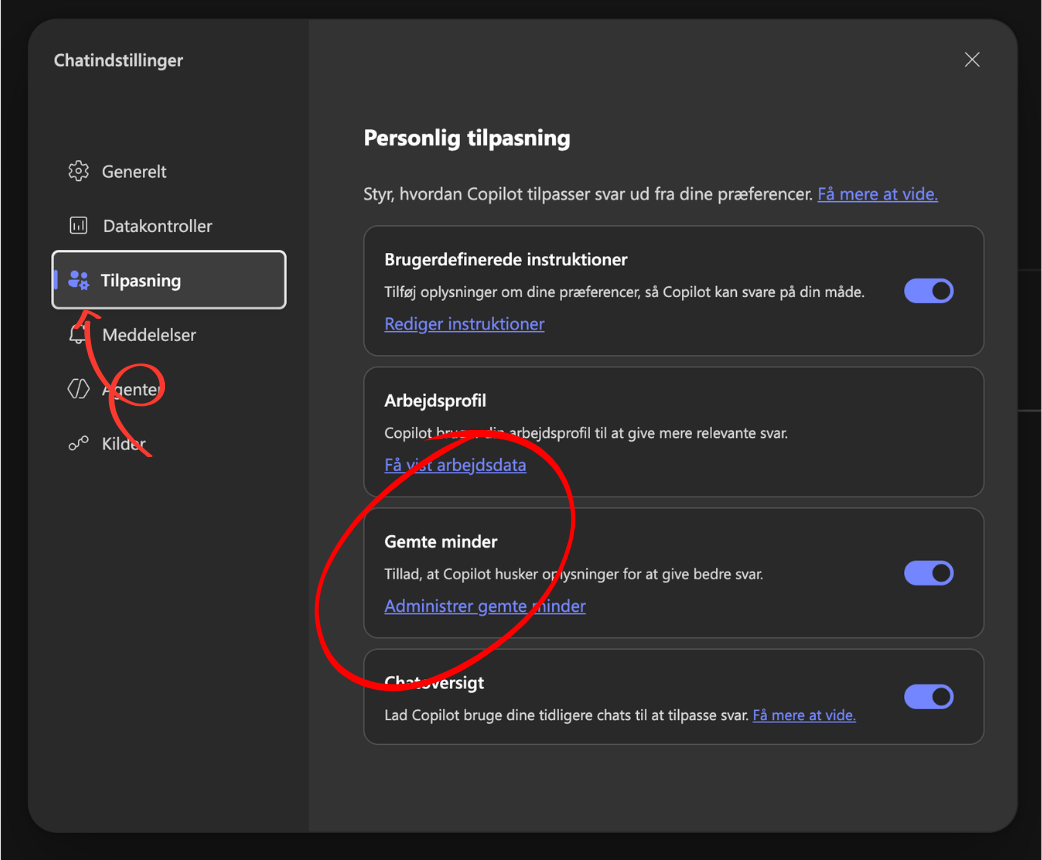
You can find and manage Copilot's saved memories about you under Settings > Personalization. Here, you can of course also disable the feature if you wish. In the same place, you can give Copilot general instructions on how you want it to act when you work together.
When you chat with Copilot, you can also ask it to update its memory if you want to ensure it remembers something for next time.Try it yourself: Check what Copilot already remembers about you – and feel free to modify its memory if it remembers incorrectly, should know more… or needs to forget something again.

Good advice for getting to know M365 Copilot (even better)
Now you know the most important features of M365 Copilot. However, the best way to get to know the tool is to explore it yourself and experiment.
If you are unsure about something, it is often worth asking Copilot itself for advice. It knows its own features and can guide you on how to use them best.
You could even provide it with the link to this guide and ask how you can use the features above in your own tasks. For example, ask it to suggest which agent you could create yourself based on what it knows about you, along with a detailed step-by-step guide on how to do it.
But remember! Just because you can use M365 Copilot for your tasks doesn’t necessarily mean you always should. The tool can undoubtedly save us all a lot of time and hassle, but we must also be cautious not to optimize away the joy of our work.
It’s about quality: Use Copilot where it enhances your work life and improves the quality of your task execution. If not, then it’s better to leave it. Know yourself and your preferences.
A final encouragement: Talk to your colleagues about Copilot
At some workplaces, AI is used in secret. That’s not how we do things here at SDU.
Using AI responsibly, effectively, and imaginatively is a team sport, and therefore we encourage you to talk openly with your colleagues about how you use AI in your work.
Share both your coolest prompts and your biggest failures; your best as well as your bitterest experiences. Ask about what your colleagues use Copilot for, be curious, and talk openly about artificial intelligence at your team and department meetings.
In short: Look over each other’s shoulders when working in M365 Copilot. That’s how we all get to know the technology better – and become smarter about how to use it best.
Would you like to learn more about artificial intelligence?
If you want to learn more about M365 Copilot – or just about working with artificial intelligence in general – you are very welcome to join our courses in “Basic AI” and “Advanced AI”.
Did you know?
Do you have any questions?
You are always welcome to contact us if you have questions or need sparring about the use of AI.